Showing posts with label Flipkart Information. Show all posts

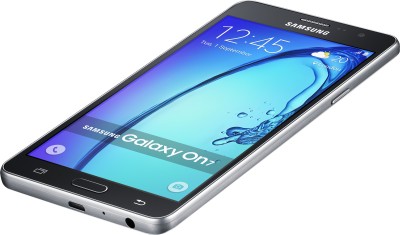
Samsung On5 – Read the reviews before you buy

Is the Samsung On5 the budget conscious user’s answer to premium features? Let’s find out what the top reviewers have to say.

The new budget phone from the South Korean giant — the Samsung Galaxy On5 — offers high-end features with an affordable price tag. A Flipkart exclusive, the phone is currently one of our most popular models on sale. Available on January 7 and January 8, 2016 at a flat discount of ₹1,000 and a discount of upto ₹4,000 on an exchange. We took a look at what reviewers across the web thought about the phone, which was launched along with the Samsung On7. Take a look at the standout features of the Samsung On5 to decide whether it lives up to the hype.

Also read: Samsung On7 – Reviews by experts and users

Here’s a review of the Samsung On5, focusing on its audio, camera, specs and apps.
With a 5-inch capacitive touchscreen showcasing 720×1280 pixels with 288 ppi pixel density, no wonder Marco D’Souza of DNA found the phone’s display commendable. Read his full review here.

For a lower-mid-range phone, the Samsung On5 TFT screen appeared surprisingly sharp, bright, and with well-defined colors. Even in bright outdoor sunlight there was no issue with readability.
Click to read more (leads to an external site)
Vishal Toshiwal of PhoneRadar tested the Samsung On5’s 2,600mAH battery, and came away convinced of its one-day promise. Read his full review here.

“Samsung couldn’t have packed larger battery than 2600mAh on the ON5. It’s around perfect for size and display it comes, with Exynos chipset being optimized for the battery usage, there are tons of things you could do with the device and still get away with a battery of more than a day.”
Click to read more (leads to an external site)
This Twitter user appreciates both the screen size and performance:
Here’s Gadget Diary’s in-depth gaming review video of the Samsung On5.
One of the most exciting features of the phone is its 8MP rear camera and 5MP selfie camera, both of which capture a wide 120-degree angle, and Shaona Saha of International Business Times explains its features. Read the full review here.

“Camera buffs get plenty of reasons to love the phone since it has an 8 MP rear camera that delivers sharp details. Adjust any underexposed image with the “Pro” mode that helps bring a striking balance between white colour and ISO.”
Click to read more (leads to an external site)
With Wi-Fi and 4G LTE, the Samsung On5 is all about fast streaming and downloads. Ketan Pratap of NDTV’s Gadgets 360 talks about the phone’s software advantages. Read his review here.

“On the software front, Samsung also advertises that the Ultra Data Saving (UDS) mode will help users save up to 40 percent on data usage when streaming videos, shopping online, or downloading files. The MixRadio app means that users will get access to 30 million songs across different languages.”
Click to read more (leads to an external site)
This Twitter user is also excited about saving up to half on a 4G data plan:
The phone has a dual SIM, internal storage of 8GB (expandable to 128 GB), HD TFT display, a long-lasting battery, a good camera with a lot of features, good audio, FM radio, an accelerometer, and in-built software that Samsung fans have known and loved. The price for all these features is a mere ₹8,990.
Available exclusively on Flipkart, you can check out the phone’s gold and black version here and here.


Samsung On7 – Reviews by experts and users

Is the Samsung On7 a feather in the company’s cap? Does it stay true to the quality of the Galaxy series? Let’s see what reviewers think.

Launched in November 2015, the Samsung Galaxy On7 has taken the Indian smartphone market by storm. Priced at an affordable ₹10,990, it generated a lot of hype in the mid-segment market with features like its 13 MP rear snapper, TouchWhiz user interface and battery life. The smartphone is now available on Flipkart during January 7 and January 8, 2016 on a special offer price—at a flat discount of ₹1,000 and a discount of upto ₹5,000 on an exchange.

Also read: Samsung On5 – Read the reviews before you buy

Coupled with Samsung’s great after-sales service, the Galaxy On7 seems to be one of the best available smartphones in the price segment it occupies. But is the phone really all that it’s made out to be? Let’s see what reviewers and users of the device are saying.
Twitter users @RachanaTrivedi1 and @KhanAzam60 were taken by the phone’s screen size and OS:
The phone became so popular right after its launch that it even knocked out Apple’s iPhone 6s in GSM Arena’s ‘Top 10 Trending Phones’ list!

The popularity of the Apple iPhone 6s dropped, after two weeks in 5th it now resides just above the last place in the Top 10. That place is occupied by a newcomer – the Samsung Galaxy On7. While the Js are already pretty affordable, On series pushes things even further. The Galaxy On7 packs a 5.5" 720p screen, a modest quad-core 1.2GHz processor and a surprisingly decent camera department: 13MP/1080p main shooter and a 5MP selfie cam.”
Click to read more (leads to an external website)
With a 5.5-inch HD TFT display, the On7 runs on Android Lollipop v5.1 and has a 1.2 GHz Qualcomm Snapdragon 410 Quad Core Processor and 1.5 GB of RAM. Its display and color output impressed @Broken_Angel_09:
Vishal Toshiwal of PhoneRadar found himself very satisfied by the phone’s performance. Read his full review here.

The TouchWiz UI on Galaxy ON7 offers snappy performance and animations, thanks to the Qualcomm’s Snapdragon 410 chipset. The interface hasn’t changed much in terms of the app drawer, as you still have app drawer and home screen separate, which is a good thing. The icons are square but with round shape and that is something new from the old interface.
Click to read more (leads to an external website)
The phone’s 13 MP rear camera and 5 MP front camera is being referred to as quite impressive. Youtube channel Techniqued‘s Nirmal tells us why. Read his full review on his website here.

Talking about the camera performance, the On7 camera is a very good performer and has good quality overall in the daylight shots which we took. The colors have come pretty good and so is the sharpness and overall detailing of the photos looks great in close-up shots. Even when you zoom in there isn’t too much loss of clarity
Click to read more (leads to external website)
Twitter user @honey1925 agrees with the phone’s superior shutterbug specs:
Equipped with a 3,000Ah battery, the phone has also found admirers like Srivatsan Sridhar of FoneArena, who also appreciate Samsung’s power saving modes.

Coming to battery life, the 3000mAh battery lasts for the whole day from average to heavy use such as 4G LTE with both the SIM cards, similar to the Galaxy J7. With minimal use, it lasts for more than a day. The power saving mode and ultra power saving mode lets you extend the battery life. The smartphone also has a removable battery, so you can swap it easily when required
Click to read more (leads to an external website)
Read the full review here.
All in all, the Samsung On7 wins with its phablet screen, dual SIM (both 4G LTE), expandable storage capacity of 128 GB, high performing camera, OS and UI. The phone is also equipped with MixRadio (which offers access to over 30 million songs), and the Ultra Data Saving Mode (UDS), which saves up to 50% of your 4G data while you stream, browse or download videos and content—making it a popular choice for the mid-segment consumer.
Twitter user @prosenjit066 agrees:
For a short yet succinct synopsis, watch Gadget Diary’s ‘7 Reasons Why you Should Buy Samsung Galaxy On7’ video here:
The phone is exclusively available on Flipkart, so check out its gold and black avatars here and here.


#FlipkartImageSearch rocks HRC Bangalore

A rendezvous with bloggers during the Flipkart Image Search event at Hard Rock Café, Bangalore.

Earlier last month, Flipkart launched the ‘Image Search’ feature on the mobile app, enabling shoppers to use images as a base for discovering visually alike products. The idea was relatively simple—‘see, shoot and buy’ fashion merchandises, in just a few clicks.

Shopping for products in this category can be quite a task, especially when users are trying to verbally search and find something that have visually triggered their purchase intent. In other words, describing an image can end up running into a thousand words.
A few weeks after the new feature was launched on the Flipkart app, the product development team wanted to get a true sense of how Image Search was being received. So Flipkart did something a little hatke.
The Bloggers Meet
On the first of August, a meet was organized with some of the country’s best independent bloggers—after all, who better to give a pure point-of-view than bloggers who dabble in the fashion and technology spaces, that too every day!
The Bloggers Meet was organized between 10.30 a.m and 3.30 p.m, on the first of August. And being a Saturday, HRC-Bangalore was chosen as an apt venue for the bloggers to unwind and for Flipkart to unravel everything around the newly launched Image Search feature.
With over 100 curious bloggers and many more anticipatory tweets and messages on social media, the event kicked off with blogger introductions, giveaways and an opening gig by the Indi Band (courtesy, our event partner – the IndiBloggers).
The Band_New
The ice breaker was done and the spirit was high on the floor. Flipkart’s social team was checking on the event trends and noticed that bloggers had already started tweeting on #FlipkartImageSearch. Next up, was Punit Soni, Flipkart’s Chief Product Officer, who took the stage and gave the crowd an overview of how relevant mobile is in India and the drastic shifts in adoption that he has seen over here against the US. The numbers were pretty crazy!
Punit_new
Hands popped up and questions were brewing, but the animated bloggers had to hold on for some more time. Why? Because the demo and experience sessions were coming up, to provide some answers to those questions!
The demo session opened up with a video on Image Search, setting the context for its application.
Akshay Rajwade, Director of Mobile Product and Deepali Tamhane, Head of Discovery & Personalization took the crowd through the Image Search feature and usage. The other guests at HRC kept peeping over during the real-time demonstration of the feature.
Curiosity was swelling on the floor and it looked like no one wanted to wait for the Q&A session. The flood gates opened and questions poured in. After Akshay and Deepali paddled through most of them, the experiential games began.
The bloggers were divided into teams and were given the task of using the Flipkart Image Search feature and finding as many ‘close-to-actual’ search results. Great grub and an open bar kept the ‘spirits’ high and in the end the team with the most number of positive search hits in their shopping wish list won free Flipkart vouchers.
The contest was over and the clock struck 3.30 p.m. #FlipkartImageSearch was on a Twitter rampage throughout the day and was trending in India. Bloggers were casually catching-up with Flipkart Product team members, in deep discussions around the feature. The MC tapped the mic, thanked the bloggers for their participation and feedback, and announced the close of the meet. With energy still high and buzz still on, the bloggers slowly parted, and later blogged about their experience.
‘Simply point and shoot an image of the item you are looking for and the app automatically throws together a list of things specific to your needs. Not only does it do away with confusion but is also a much more efficient use of one’s time and a rather simplistic approach to digital shopping,’ mentions Vikram on his blog Desi Brands.
‘Just from a daily life example, if I find a nice running shoe being wore by someone at park next day morning, I just have to take a picture of the shoe and upload that on Flipkart and I will get similar matches and recommendations. That means, instead of carrying a paper cut from a magazine, carrying a picture of my favourite product’s image on my camera phone,’ writes Amar Shekhar from the Indi Bloggers community.
It was time for the Flipkart team to head back home—some great experiences to look back at from the Image Search Bloggers Meet and some incredible insights on the feature for the future.
#Flipkart – waiting for the next feature update.


What’s cool about the Flipkart Universal app on Windows 10

Last year, in August, Flipkart launched the Ping feature, a unique addition to the app-only shopping space that allows users to communicate through the Flipkart mobile app. More recently, Flipkart created and launched Flipkart Lite — a web-app that brings together the best of the web browsing experience and the richness of a native app. The innovation opened the gates to a seamless shopping experience, even under low network availability. Flipkart is always innovating to improve your shopping experience and the latest development is the Flipkart Windows 10 app.
The world loves Microsoft Windows and there is a huge population of internet users in India who find comfort in using the Windows OS. Flipkart understands this and our team worked hard over the last few months to create an incredible shopping experience native to Windows devices. Having spent days deliberating on how a stellar native-app-like experience can be delivered to those who want richer app-like experience on Windows desktops, Flipkart has worked closely with the Microsoft team to develop the Flipkart app for a universal Windows platform. It gives you the benefits of a native app on the desktop. Here’s what you can expect to see on the Flipkart Windows 10 app:
Flipkart Windows 10 App

Richer app-like experience

Redefining the shopping experience for Windows 10 users, the Flipkart app brings a number of features, previously restricted only to the mobile app, to desktop. Features such as image search, where a user can upload a picture of a product to find similar products, will now be available to desktop users. The Flipkart Windows 10 app will also enable users to access better offers, which are presently restricted to the Flipkart mobile app. More shopping, less hassle.
Flipkart Windows 10 App

Flipkart Windows 10 app is more personal

The Flipkart Windows 10 app experience is highly personalized. Under normal circumstances, shopping on a desktop is less customized and this is what we wanted to change. From recommendations, merchandising and notifications to offers, everything will be customized for you.
Flipkart Windows 10 App

Flipkart Windows 10 app is optimized for all devices

The Flipkart Windows 10 app has been developed with hybrid devices (touch and non-touch) in mind. Optimized for use of different inputs like touch, keyboard, trackpad and mouse, it mirrors the Windows OS saving you the hassle of adapting to a different shopping experience. For power users, the app can also be navigated using only the keyboard, giving you that much flexibility in where and when you are using it. Use familiar shortcuts Ctrl+F to start searching and the arrow keys to navigate products!
Flipkart Windows 10 App

Multiple Product Tabs at a time

The Flipkart Windows 10 app also introduces Product tabs. These will enable customers to open tabs in the background to view products later. Making for easier product comparison between different products and allowing for a more streamlined browsing experience, it’s bound to change the way you shop entirely.
Want to try it out? Download the app here and give it a shot. We’re waiting to hear your feedback and know how we can do better. Tweet to us @FlipkartStories and @Flipkart_tech
*Users must be running the Windows 10 OS in order to download the app.