
A rendezvous with bloggers during the Flipkart Image Search event at Hard Rock Café, Bangalore.
Earlier last month, Flipkart launched the ‘Image Search’ feature on the mobile app, enabling shoppers to use images as a base for discovering visually alike products. The idea was relatively simple—‘see, shoot and buy’ fashion merchandises, in just a few clicks.
Shopping for products in this category can be quite a task, especially when users are trying to verbally search and find something that have visually triggered their purchase intent. In other words, describing an image can end up running into a thousand words.A few weeks after the new feature was launched on the Flipkart app, the product development team wanted to get a true sense of how Image Search was being received. So Flipkart did something a little hatke.
The Bloggers Meet
On the first of August, a meet was organized with some of the country’s best independent bloggers—after all, who better to give a pure point-of-view than bloggers who dabble in the fashion and technology spaces, that too every day!
The Bloggers Meet was organized between 10.30 a.m and 3.30 p.m, on the first of August. And being a Saturday, HRC-Bangalore was chosen as an apt venue for the bloggers to unwind and for Flipkart to unravel everything around the newly launched Image Search feature.
With over 100 curious bloggers and many more anticipatory tweets and messages on social media, the event kicked off with blogger introductions, giveaways and an opening gig by the Indi Band (courtesy, our event partner – the IndiBloggers).

The ice breaker was done and the spirit was high on the floor. Flipkart’s social team was checking on the event trends and noticed that bloggers had already started tweeting on #FlipkartImageSearch. Next up, was Punit Soni, Flipkart’s Chief Product Officer, who took the stage and gave the crowd an overview of how relevant mobile is in India and the drastic shifts in adoption that he has seen over here against the US. The numbers were pretty crazy!
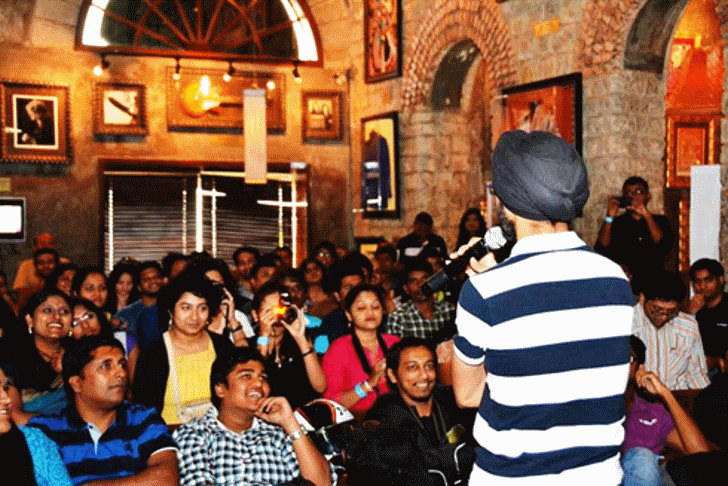
Hands popped up and questions were brewing, but the animated bloggers had to hold on for some more time. Why? Because the demo and experience sessions were coming up, to provide some answers to those questions!
The demo session opened up with a video on Image Search, setting the context for its application.
Akshay Rajwade, Director of Mobile Product and Deepali Tamhane, Head of Discovery & Personalization took the crowd through the Image Search feature and usage. The other guests at HRC kept peeping over during the real-time demonstration of the feature.
Curiosity was swelling on the floor and it looked like no one wanted to wait for the Q&A session. The flood gates opened and questions poured in. After Akshay and Deepali paddled through most of them, the experiential games began.
The bloggers were divided into teams and were given the task of using the Flipkart Image Search feature and finding as many ‘close-to-actual’ search results. Great grub and an open bar kept the ‘spirits’ high and in the end the team with the most number of positive search hits in their shopping wish list won free Flipkart vouchers.
The contest was over and the clock struck 3.30 p.m. #FlipkartImageSearch was on a Twitter rampage throughout the day and was trending in India. Bloggers were casually catching-up with Flipkart Product team members, in deep discussions around the feature. The MC tapped the mic, thanked the bloggers for their participation and feedback, and announced the close of the meet. With energy still high and buzz still on, the bloggers slowly parted, and later blogged about their experience.
‘Simply point and shoot an image of the item you are looking for and the app automatically throws together a list of things specific to your needs. Not only does it do away with confusion but is also a much more efficient use of one’s time and a rather simplistic approach to digital shopping,’ mentions Vikram on his blog Desi Brands.
‘Just from a daily life example, if I find a nice running shoe being wore by someone at park next day morning, I just have to take a picture of the shoe and upload that on Flipkart and I will get similar matches and recommendations. That means, instead of carrying a paper cut from a magazine, carrying a picture of my favourite product’s image on my camera phone,’ writes Amar Shekhar from the Indi Bloggers community.
It was time for the Flipkart team to head back home—some great experiences to look back at from the Image Search Bloggers Meet and some incredible insights on the feature for the future.
#Flipkart – waiting for the next feature update.


